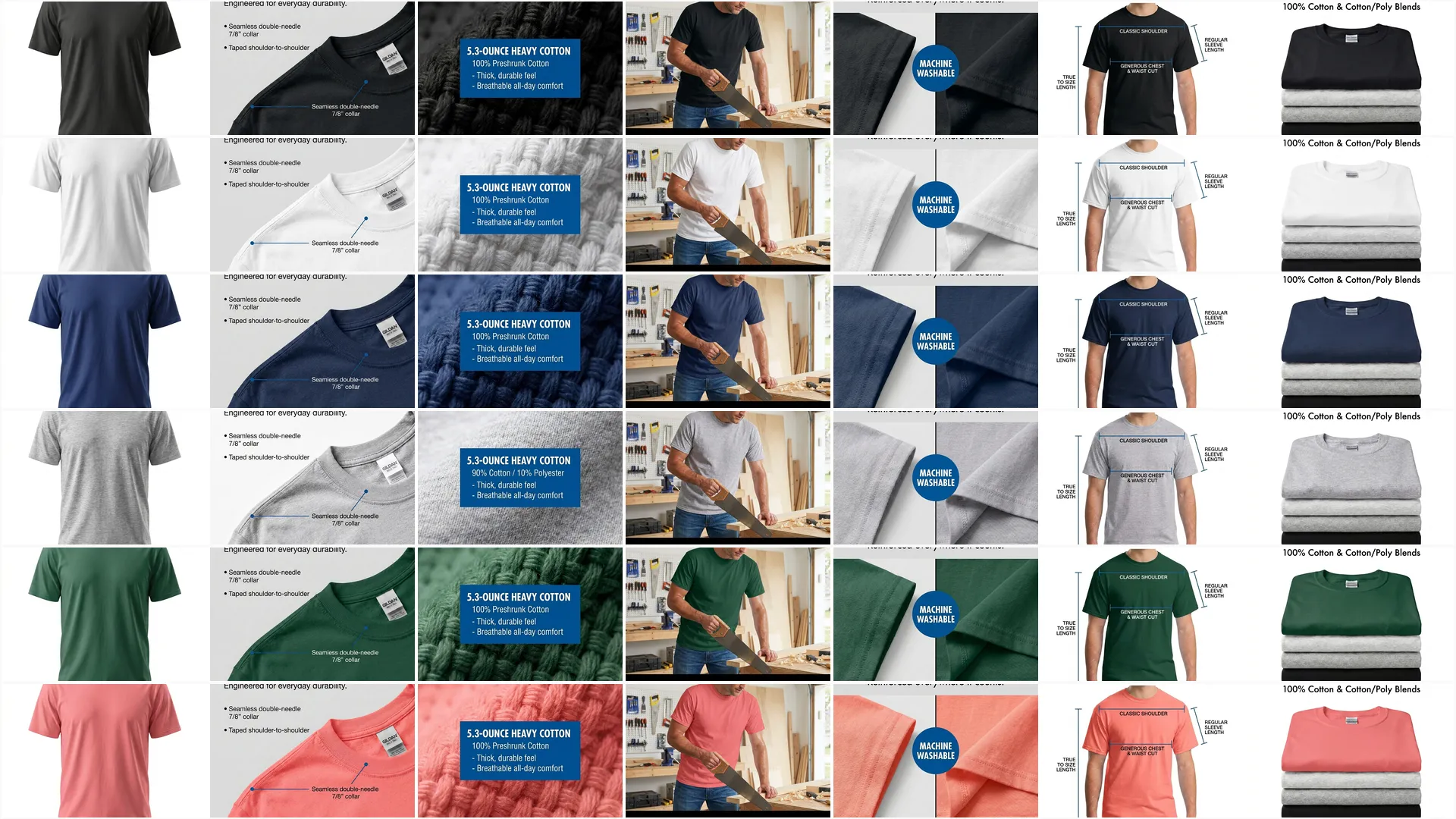

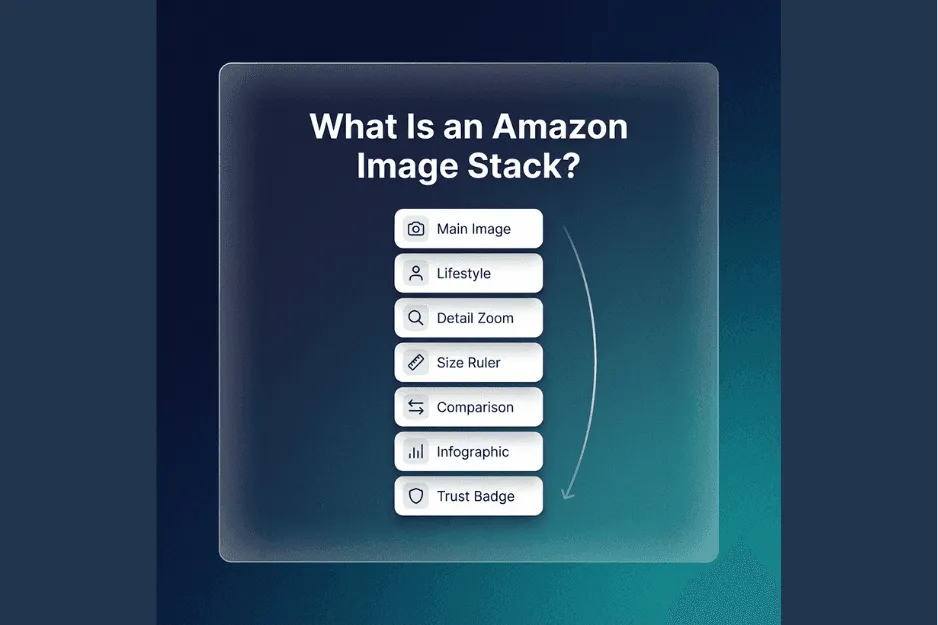
An Amazon image stack is the planned sequence of images on your Amazon listing, designed so the first image boosts CTR from search and the full set boosts CVR on the detail page by making the product instantly understandable. A good stack is not more photos, it is fewer surprises.
3 experts’ quick takes
- Conversion optimizer: Your main image is a CTR lever, the rest of the stack is a CVR lever, each slot should answer one buyer question cleanly. If you mix claims, hide scale, or get sloppy on requirements, you pay twice, fewer clicks and fewer orders.
- Agency operator: A stack is a system, not a design sprint. Standardize slots, lock templates, and reduce revision loops by making every change traceable to CTR or CVR.
- Creative director: Visual hierarchy wins on mobile, one message per frame, big proof, fewer words. Realism matters, weird AI artifacts quietly kill trust.
| Stack element | Purpose | What it should show | What to avoid | How Pixii helps |
|---|---|---|---|---|
| Main image | Win the click, set expectations | The exact product for sale, instantly legible at thumbnail size | Extra text, clutter, confusing bundles, anything that changes the product | Generates a clean main image and lets you standardize the same framing across variants fast |
| Benefit infographic | Compress the value prop into 3 seconds | Top 1 to 3 benefits with simple proof cues | Paragraph text, tiny fonts, vague claims | Uses ready-made infographic layouts, tuned for mobile readability, then quick edits in the editor |
| Lifestyle in-context | Make the product feel real | The product being used in a believable setting with correct scale | Unreal scenes, warped products, misleading use cases | Generates in-context scenes from your product input, then keeps the product consistent across shots |
| Feature close-up / materials | Prove quality and details | Texture, materials, closures, interfaces, key parts | Soft focus, fake textures, heavy filters | Creates sharp close-ups and callouts, and lets you swap crops without redesigning the whole image |
| Size + scale cue | Prevent returns and hesitation | Dimensions, thickness, capacity, fit, or placement in a common context | Misleading angles, inconsistent references | Adds clean dimension overlays and consistent scale references across the set |
| Comparison / differentiation | Answer why you vs alternatives | A simple comparison chart focused on your differentiators | Naming competitors, unprovable superlatives, cluttered tables | Produces compliant comparison layouts you can reuse across an entire line |
| What’s included + proof | Remove bundle confusion | Exactly what arrives, plus any legitimate proof you can support | Fake badges, implying extra items, noisy icon soup | Builds a clear included-items layout and keeps proof cues consistent and on-brand |
| A+ module images | Extend story for late-stage buyers | Deeper use cases, components, process, brand visuals | Dense text blocks, inconsistent styling | Generates A+ style modules that match your gallery, so the page feels like one system |
| Brand story / trust | Reduce risk perception | Brand promise, guarantee language, trust signals | Fluffy mission copy, over-claiming | Applies a repeatable brand system across all ASINs, so trust builds through consistency |
Key takeaways
- Treat the gallery like a funnel, image 1 earns the click, images 2 to 7 earn belief.
- Each slot should have one job, benefit, use, feature, size, differentiation, proof.
- Design for mobile first, tiny text and dense charts fail even if they look great on desktop.
- Build once, then scale, the same stack logic should ship across variants and across ASINs with minimal rework.
What an image stack is (and what it is not)
An image stack is the intentional order of images in your Amazon gallery, where every slot has a specific buyer question it answers.
- It is a planned sequence, not seven random pics
- It is not just pretty lifestyle shots, it is decision support
- It is not only compliance, it is comprehension plus trust
- It is not only the gallery, A plus can extend the story, but the gallery must close the sale first
Why stacks win (the conversion mechanics)
CTR is the click through rate from search results to your detail page. Your main image is the primary visual input to that decision, so clarity and conformity matter.
CVR is the percent of visitors who buy once they land. The stack improves CVR when it lowers uncertainty fast, what is it, what do I get, will it fit, will it work for me, is it better than the alternatives.
Cause and effect is simple: fewer unknowns means fewer drop-offs. When your images show the product clearly and enable zoom, shoppers can inspect details instead of guessing, and Amazon’s own guidance links zoom to better sales outcomes. (https://m.media-amazon.com/images/G/35/sp-marketing-toolkit/Sellerfacingguides/Amazon_Listings_Product_Detail_Page_Guide.pdf)
The canonical stack for most products (7 images)
For most categories, you have enough gallery real estate to build a tight story. Many sellers structure around seven visible slots because Amazon commonly shows the first seven images in the live gallery, even if you upload more. (https://www.junglescout.com/resources/articles/amazon-image-requirements/)
A practical way to think about the canonical seven is: click, understand, believe, compare, confirm, then buy.
- Image 1 is the click, clean and obvious
- Images 2 to 3 explain the promise and show it in context
- Images 4 to 6 answer objections, quality, size, differences
- Image 7 closes with what is included and proof you can trust
Amazon provides room to upload up to nine images, but notes that only the first seven typically display, or six if video appears in the gallery. (https://www.junglescout.com/resources/articles/amazon-image-requirements/)
If you are tempted to pack multiple ideas into one image, do the opposite, split it. Mobile shoppers scan, they do not study.
Step-by-step: build your image stack in Pixii
- Go to the Pixii dashboard.
- Add your ASIN or product link, or upload your best product photos.
- Generate the image stack in one run, so you get a full set with consistent style and slot intent.
- Review each slot for intent, label the job as CTR or CVR, and confirm the order matches the buying journey.
- Check for label drift, logos warped, packaging changed, or missing accessories, fix the source inputs before you polish outputs.
- Open the editor and make exact edits fast, lock the product layer first, then adjust background, lighting, and callouts.
- Validate mobile readability, zoom out to phone size and remove any text that becomes a blur.
- Add a size and scale cue that is honest, then sanity check it against the real dimensions to avoid misleading expectations.
- Build the comparison and differentiation image without naming competitors, focus on your measurable differentiators and included items.
- Add proof carefully, only use claims, certifications, and icons you can back up with real documentation.
- Run a final background and main image compliance pass, main image background issues and extra text are the fastest way to trigger suppressions in many categories. (https://www.junglescout.com/resources/articles/amazon-image-requirements/)
- Export for Amazon upload, keep originals for future variants, and reuse the same stack blueprint across similar ASINs.
Common failure modes to catch before upload
- Label drift: text on the package changes, looks fake, or becomes unreadable, fix by anchoring to a clean source photo and reducing aggressive edits
- Unreadable mobile text: you designed for desktop, reformat for fewer words and larger type
- Misleading scale cues: oversized props or perspective tricks, switch to a neutral reference like a hand, ruler, or common object
- Main image background issues: not clean, not consistent, extra graphics, fix the background and remove overlays where your category requires it
https://amazon-listing-grader.pixii.ai/ https://pixii.ai/ecommerce https://pixii.ai/updates/ai-just-broke-photoshop https://pixii.ai/updates/increase-amazon-conversion-rate-without-more-ads-a-practical-guide-for-faster-add-to-cart
Amazon constraints you cannot ignore
Amazon’s own product detail page guide calls out baseline image requirements: images must accurately represent the product, match the title, and the product should fill at least 85 percent of the image. (https://m.media-amazon.com/images/G/35/sp-marketing-toolkit/Sellerfacingguides/Amazon_Listings_Product_Detail_Page_Guide.pdf)
For zoom, Amazon states the optimal experience requires 1600 pixels or larger on the longest side, with 1000 pixels as the smallest file size for zoom and 500 pixels as the smallest for the site. (https://m.media-amazon.com/images/G/35/sp-marketing-toolkit/Sellerfacingguides/Amazon_Listings_Product_Detail_Page_Guide.pdf)
Amazon also lists supported formats as JPEG, TIFF, PNG, or GIF and notes their servers do not support animated GIFs. (https://m.media-amazon.com/images/G/35/sp-marketing-toolkit/Sellerfacingguides/Amazon_Listings_Product_Detail_Page_Guide.pdf)
Category rules vary, for example Amazon’s apparel imaging guide specifies pure white background for MAIN images with RGB 255,255,255 and the product filling at least 85 percent of the image area. (https://m.media-amazon.com/images/G/01/SPIS/Fashion_Apparel_Imaging_Guidelines_Spring_2021.pdf)
If you are unsure, verify in Seller Central for your category, then design the stack to the strictest constraint you must meet.
A fast QA checklist
- Main image shows the product clearly and fills at least 85 percent of the image. (https://m.media-amazon.com/images/G/35/sp-marketing-toolkit/Sellerfacingguides/Amazon_Listings_Product_Detail_Page_Guide.pdf)
- Images are not blurry, pixelated, or jagged. (https://m.media-amazon.com/images/G/35/sp-marketing-toolkit/Sellerfacingguides/Amazon_Listings_Product_Detail_Page_Guide.pdf)
- Longest side is sized for zoom, target 1600 pixels or larger when possible. (https://m.media-amazon.com/images/G/35/sp-marketing-toolkit/Sellerfacingguides/Amazon_Listings_Product_Detail_Page_Guide.pdf)
- File type is one Amazon supports, and you did not upload an animated GIF. (https://m.media-amazon.com/images/G/35/sp-marketing-toolkit/Sellerfacingguides/Amazon_Listings_Product_Detail_Page_Guide.pdf)
- If your category requires it, MAIN image background is pure white and has no extra graphics. (https://m.media-amazon.com/images/G/01/SPIS/Fashion_Apparel_Imaging_Guidelines_Spring_2021.pdf)
- Additional images do not imply items are included when they are not. (https://www.junglescout.com/resources/articles/amazon-image-requirements/)
- You used your available gallery slots, sellers can upload up to nine images, but prioritize the first seven. (https://www.junglescout.com/resources/articles/amazon-image-requirements/)
- Your lifestyle image gives a realistic understanding of the product, not a confusing fantasy scene. (https://www.shopify.com/in/blog/12206313-the-ultimate-diy-guide-to-beautiful-product-photography)
- Scale and dimensions are clear enough to reduce returns and hesitation. (https://www.junglescout.com/resources/articles/amazon-image-requirements/)
- Ads safe check, the image displays the entire product and uses minimal or no staging where required for commerce feeds. (https://support.google.com/merchants/answer/6324350?hl=en)
- Packaging shots, if used, show multidimensional packaging, not only the front panel. (https://support.google.com/merchants/answer/6324350?hl=en)
- Colors look consistent across devices by exporting in a standard color space like sRGB. (https://www.w3.org/Graphics/Color/sRGB.html)
When Pixii wins (concrete and testable)
- You manage many ASINs and need a consistent stack blueprint across the catalog, not one-off hero images.
- You have many variants, colorways, or bundles and need fast, controlled edits without restarting from scratch.
- You refresh listings weekly or monthly, new claims, new packaging, new angles, and you cannot afford rework cycles.
- You run an agency workflow where throughput and standardization matter more than bespoke art direction.
- You need fewer redo loops, one generation gives you the full stack, then you edit the exact slot that is failing CTR or CVR.
- You want clearer sets, fewer misleading cues, and fewer internal debates about what each image is supposed to do.
- You want a single system that produces gallery images plus A plus style modules with the same brand rules.
- You care about auditability, the stack has a repeatable structure you can QA before upload.
FAQ
What is the difference between an image stack and A plus content The image stack is the gallery sequence every shopper sees immediately, A plus is an extended section that can deepen story and proof after the gallery does its job. (https://m.media-amazon.com/images/G/35/sp-marketing-toolkit/Sellerfacingguides/Amazon_Listings_Product_Detail_Page_Guide.pdf)
How many images should I upload Many sellers upload up to nine images, but optimize the first seven because those are commonly what shoppers see in the gallery. (https://www.junglescout.com/resources/articles/amazon-image-requirements/)
Which image impacts CTR the most The main image, it is the primary visual in search and browse, so it should be instantly legible at small sizes. (https://www.junglescout.com/resources/articles/amazon-image-requirements/)
Which images impact CVR the most Benefit, lifestyle, size, and proof images, because they reduce uncertainty and make the purchase feel safe. (https://www.shopify.com/in/blog/12206313-the-ultimate-diy-guide-to-beautiful-product-photography)
Do I need 1600 pixels Amazon says 1600 pixels or larger on the longest side is optimal for zoom, with 1000 as the smallest for zoom and 500 as the smallest for the site. (https://m.media-amazon.com/images/G/35/sp-marketing-toolkit/Sellerfacingguides/Amazon_Listings_Product_Detail_Page_Guide.pdf)
What file types should I use Amazon lists JPEG, TIFF, PNG, and GIF as supported formats and notes animated GIFs are not supported. (https://m.media-amazon.com/images/G/35/sp-marketing-toolkit/Sellerfacingguides/Amazon_Listings_Product_Detail_Page_Guide.pdf)
Can I add text to images On additional images, many sellers use infographics to explain benefits, comparisons, and size, but keep it mobile readable and avoid anything that looks like a watermark or promo stamp. (https://www.junglescout.com/resources/articles/amazon-image-requirements/)
What is the safest way to show scale Use a direct reference and honest dimensions, and avoid perspective tricks that make the product look larger than it is. (https://www.junglescout.com/resources/articles/amazon-image-requirements/)